
How To Check If Someone Is Stealing Your Internet
Home Networks and Wireless access is booming in households now, and quite often you hear stories about people getting fined for neighbours or people on the street downloading illegal material of your internet account. So how do you find out who has been using your internet, and how to stop people from access your home network and confidential files on your computer?
So what are some signs you can look out for and notice to see if someone is actually using your internet?
- Your internet is being slowed
- Your ISP is shaping you (or charging you extra) for going over your download limit
- Your shared computer files are being modified
- Your router log shows other computers have accessed the network
So if you think someone is using your internet, what should you do and why are they doing it?
Why And How Would Someone Steal My Internet?
The most common reasons why people steal your internet is:
- They don’t currently have access to their own internet (or even through their own mobile internet)
- They want to download something that will go over their limit so they would use yours.
- They want to do something illegal like download porn, music or movies
- They want to access your computer and steal your data and information
There are plenty of other reasons, but these are the most common.
So how do people access your home network and steal your internet is all in how your network is configured. The most common way how people access your network is by having an unsecured wireless network. In the image, the highlighted SSID is my neighbours, and lucky for him, it has been secured. So to get in, I would need to know their WPA2 key (which I don’t know). People may try common keys like 123456 or password to see if they get in, so it’s best not to use a word or number sequence.

How To Find Out If Someone Is Actually Using My Internet
There are many different ways to do this, but I will show you are few common ways on how you can tell. The first and probably the easiest way are to see what computers your computer can find on the network. It’s quite simple to do, simply open up your Network Settings and see what devices are currently switched on. If there are devices you don’t recognise the names of, they may be your neighbours or some stranger off the street.
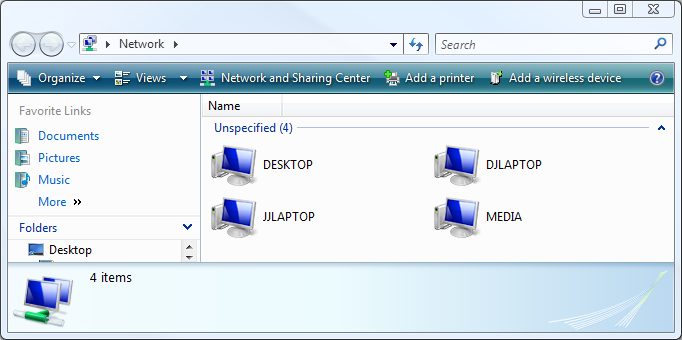
The second way to tell is to log on to your router/modem and see what devices are connected. To find out the IP address of your router, open up command prompt and type ipconfig and enter the Default Gateway IP Address into your web browser. In my case, it’s 10.1.1.1 (yours may be like 192.168.0.1)

Once you have logged in, you will see something under LAN or DHCP, and that will likely list all the computers that have been connected to your network.

You may notice that there is one extra computer in that list (compared to the image above of the 4 computers), but that’s computer is one of mine, and it’s connected via Ethernet, so unless someone has a physical line to my router, I know I can trust it.
How To Secure My Home Wireless Network?
It’s actually quite simple to do, and while you are logged into your routers homepage, you my as well check your security now.
Basically, if you have a wireless router or access point, you want to have an encryption key set up, so only people who know that key can access your network. If you don’t have an encryption key, anyone near your house can connect to your home network and use your internet.
To set this up, go to your Wireless configuration page and just set up your key – it’s quite simple.
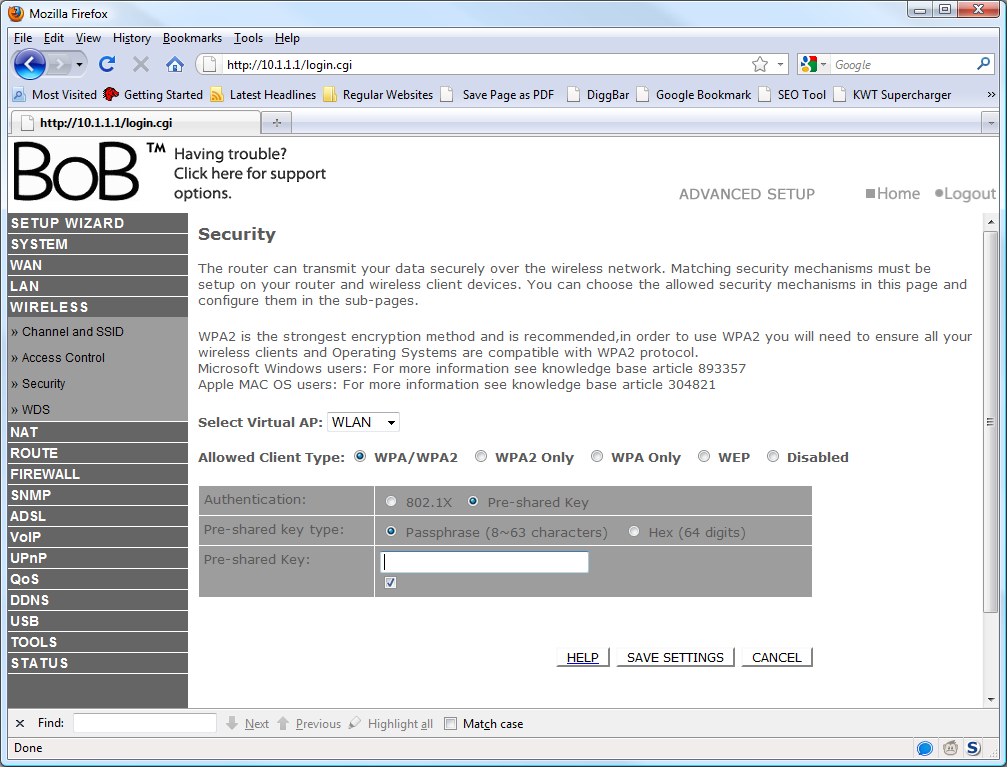
To also safeguard your home network, you can also use MAC filtering. MAC stands for Media Access Control. Every network device has one of these, so if you go to the MAC filtering settings on your router, you can set which devices can use the network. For example, say if you have set up MAC Address filtering to only allow one (your) computer to access the internet, if you don’t have a wireless encryption key setup on your router, and a stranger connects, they will not be able to connect to the internet because your MAC Address filter will block it. So to double safeguard your network, you should enable both.
So hopefully, you have now secured your home network, learnt how to safeguard your home network and find out how to find out who is using your internet.
If you have discovered from this post that someone is in fact stealing your internet, you may be interested in reading this article “What you can do if your neighbour is stealing your wifi“.
If you have any questions about this post, please post in the comments or contact me directly.



I hope you can help me because someone is getting on my secured wireless network, and it’s driving me nuts.
I have a Linksys WRT120N router from Cisco “secured” with WPA2-Personal. Last week my ISP sent an email saying that I had infringed on copyright by torrenting an episode of a television show – a show I have NEVER seen in my life! This prompted me to check my router and I found two unidentified devices on the router. I reset the router and created a new SSID, a new password, and a new security key (upper lower alpha numeric punctuation, etc). Later that night, one of the intruders popped up on the network again. I spent the next day researching on the internet and did the following: created new SSID, password, and key AGAIN, enabled mac address filtering – allowed, reset the number of DHCP users to 4, then created DHCP reservations where I assigned each IP address specifically to each of my four devices.
This seemed to fix my problem for a few days. This morning I checked my router info (as is my habit now), and a fifth MAC address was listed on my Wireless MAC filtering page. It is one of the intruding devices from before. It is on my accepted wireless MAC filtering list all of the sudden but not listed on the Wireless Client List or DHCP Client Table.
How could this be? Does this mean they tried to connect but didn’t? What can I do to actually secure the network?
The DHCP client table may have expired the IP address (usually a week or so by default). From what you have said, you have pretty much covered all basis of securing your network.
you should also change the password on your router. There are tons of ways to get through though. We test this for a living and trust me, if the guys have enough knowledge then you don’t stand a chance. Most safe bet is not to broadcast and to set up each of your devices manually to your network. This way your hijackers will not see any wireless broadcast. But before you do that, change the router admin password and see what happens.
A while back, my computer broke and my friend offered her laptop to me so that I could get my photography work done. I was suppose to have it for at least 4 months. She asked for it back within 6 weeks because she started a class and needed it for homework. I erased everything of mine and returned it. She came upstairs and asked me to give her my passcode so that she could erase my information. I told her no, but that she didn’t need it because I had already erased all of my info and I was not the main administrator. So she insisted that she needed it to delete more stuff and had me type in my passcode, (as she turned around not to look) then she tapped a key and asked me to type my secret passcode again, as she turned her head, again. She said thanks and left. Since then, everytime that I log into my computer, I have to go to system preferences and look for my network because it always states that I am “not connected” but some how it shows that I’m on her network. So then I switch it to mine, then I am connected! I just bought an IMAC and thought that it would automatically be secure but I keep getting the feeling that she knows something I don’t. On my last computer, I found that my pictures had downloaded into her laptop. She doesn’t know how that happened. What is she doing to make my information visible like, Youtube history watch, Google searches, picture uploads, ect.? I’m speechless….
Right after I posted this article on my neighbors actions, miraculously I haven’t had to change the wifi connecting account (which was 100% every time on hers) from hers to mine! This is not a coincidence… she has exercised watching my every move on the internet, from my pictures to my documents to music, you name it, she has it. i know because when I had to use her printer to print a template from the internet, I witnessed my files in her laptop. I tried telling her that it was a federal crime, but because we are renting her apartment, my husband was against me confronting her.
Even her Toshiba laptop files show up in my IMAC, but are locked. When I try to open them to find out why they are in my files, I get denied.
I am so confused, I have no idea what she did to obtain access to my files and documents and how did her Toshiba files end up in my new iMac? This is driving me nuts.
We will be moving within two months and I suspect that i will see her wifi name return again to my “system preferences” and I will have to switch again to mine as usual. She’ll be back for one “last shot at my whiskey” before I leave.
It also sounds like you have some sort of cloud synchronization happening between your computer and the laptop. DropBox, OneDrive, iCloud etc.
I am very confused. It sounds like you are describing two different things.
It sounds like you are trying to connect to a WiFI Network. My recommendation is to get someone who knows what they are doing to help her – that would be the easiest thing.
While this article helped me learn more about wireless which i would NEVER go beyond purchasing wireless but i perfer cable but i still would like YOUR information on cable connections please!! Thanks!!
This refers to an incoming cable/ADSL connection where you have a router to allow devices to connect to WiFi. Most routers/switches will have the same DHCP table.
But for cable, all you need to do is a visual check – because someone has to be physically connect a cable to your router.
Thank you I caught them, apparently they have used my internet for four months now calling my Provider tomorrow!
That’s a great outcome then!
Hi,
Thank u for all your informative posts.
I kinda have a problem – when I tried opening the web browser with the DEFAULT GATEWAY , there was this pop-up box asking for the user name and password , just for authentication.:( …. I have no clue of what these are….what should I do ??
I dont have a wirless connectivity , SO WILL MY NETWORK BE SAFE FROM STRANGERS?
Thanks
Jisha
Hello, find the make and model of your router and then look up the default username/password here: http://portforward.com/default_username_password/
If you don’t have wireless (there is a difference between don’t use and don’t have), the only way someone can steal your internet is if they physically connect a cable to your router. The only thing is you have to make sure your computer is secure.
Also check under the device for the username and password. Normally printed on a sticker together with the default Wireless password
Thanks for the extra input Wezzo!
Hi, great post, helped me a lot already 🙂
I do have a question, however, i have a completely awful college roommate, who spends all day at home, and by that i mean one room where both of us live, talking on skype in his native language, which gets tremendously annoying. Not to mention that he is a troglodyte and just living with a dirty pig is hell enough, anyway, it seems that i will be stuck in that place for a few more weeks. Thus i was wondering, how can you prevent a laptop from connecting to the internet, whether that would concern the laptop itself(messing with the drivers, though i would want that he would not be able to notice what is wrong) or the router/server. However, the wifi part is easy, but there are cables in our rooms so he just plugs that into his laptop.
So my knowledge is rather limited on how internet is distributed by companies, so as it is a dorm i dunno whether they have a server there, though i know that the internet provider is not uni, it is definitely a local provider, so they probably would not build a server as that dorm is just few hundred people, so i guess, dunno a router should be somewhere in the building which would distribute the internet. Yea, as i said, my knowledge is limited, so if you could help me out with that, i would very much appreciate it :))).
Thanks in advance, if you have even read the whole post (:
If the internet is supplied by the dorm, you won’t be able to do anything as he will likely be paying money to access the internet.
If you pay for your own internet, and have access to the router he is using, log into it and block his MAC address from access the network at certain times.
If you are concerned, go see a counselor and let them know you are worried about your room mate and see if they can help you.
Hallo. I’m not computer literate. I buy internet from a company called Freedom Internet and another MAC address will often suck up all of my usage. They don’t care in the slightest. They blocked the first few MAC addresses to do it. Today a new one came along. I don’t understand how to ensure that only my MAC address can access my internet. Also, is there any way to find out who a mac address belongs to? Theirs is F8:1E:DF:13:19:19. I don’t have the money to keep supplying this asshole with free internet. Please help.
Login into your modem router, and turn on MAC filtering to allow allow your computers MAC addresses.
Hye! thanks for the guide…i have some issues..
when i’m make a password, suddenly my lptop cant acces internet but my family can acces the internet with password..but i cant..how can?
I would talk to you local PC repairer – they will be able to help. It’s not something I can help with remotely.
I live in CA & I know my neighbor (who works at home & has several computers) was using my password protected wifi, (he helped move furniture in at one point & I had the info written on a piece of paper taped next to the router) so at first I kept turning off my router to discourage him, then he comes over, laptop in hand, screen up & asks to “borrow our passwords until he gets his service up & running” but I told him we had problems with my connection & it wasn’t working…but somehow he was able to access it – so I contacted my ISP & we changed the name of my connection & the password again. I don’t see any additional logged in, but all our computers have had problems & run slowly ever since. My question: is there a way to find out exactly when he was using my wifi? And how many times? Are records kept of IP addresses? All the info talks about being able to catch them when they are on…..not after they have logged off. It would help me out a lot. Thank you.
Depending on your router, it may record logs, DHCP last connection time etc. Check your routers manual for more info
BASTARD GUY
Hi my computers Internet page came up and had to cameras and said on and That my computer was being watched do to porno games. by the police and I could spend up to 2 or 5 years is jail but I didn’t do it what do I do I am 17 and I’am scared what do I do
Hi Bryce, sounds like you have a virus. I recommend scanning your computer for viruses.
Recently I was hacked. I have a wireless modem by ATT our IP address is no longer located where our modem is. How is this possible. Also my mother has Cox Communication for her internet provider. It is an ethernet connection. Her IP address is no longer located at our residence. Both IP address are located at a home about 1/2 mile from our residence. What is going on? I was told by ATT that I do not have MAC security and that I have to pay $50.00 to enable it and a computer tech would have to come in at the cost of $20 per computer make adjustments. My son is two months away from getting his B.A. in Computer Networking, Computer Security Systems, Syco systems and computer sound design systems. He says that there should be no charege for a Mac line and that he could configure but ATT says no way. We gotta pay
I think it’s best to get your son onto it. He should know how to resolve your issue.
JeanSmith. What on earth is a MAC line? get in contact with your service provider and request that they reset your account password with them. It is a new thing now to rather get the ISP username/password then have to sit outside somebodies house connecting through their wireless. I am not sure how it works where you live but under normal circumstance, your ISP account is not locked to a single street address. This means that as long as somebody is within the same network as your provider, they can use your ISP account details on their routers. Best solution to solving this is changing the ISP account password by requesting the change to them.
To add to this, in Australia, ISP iiNet provides Exchange level authentication, meaning, you don’t have to set any username/password in your routers config. Just directly your modem into your phone line, and away you go http://forums.whirlpool.net.au/archive/2136256
This still does not explain why her IP is being located to a different street address. 1/2 mile is way too far for your normal everyday house hold modem to broadcast. I imagine two issues based on the information. 1. This guy is somehow piggybacking off your physical line to access out. 2. This guy has somehow created a daisy chain to get out to the www via his private gateway. There are easy ways to see what route your traffic is taking. cmd tracert is the easiest. The route should in all fairness go from your PC IP to the Router IP (default gateway) and then to your local exchanges and then your ISP. If you see any public IP addresses after your router then somehow your traffic is being routed. It does not make sense that her IP (essentially her account) is displaying at a different residential address if the IP is dependent on the physical cable. I also cannot imagine how any sort of “MAC line” would fix this problem if the physical cable goes straight between house and exchange and ISP. The only other thing I can image is that technicians worked on one of the boxes and swapped the cable to her house and the 1/2 mile away house. I think this because they will still pay but be connecting via each others line rather than there own. Maybe you should ask the ISP to test what IP (account) is displaying from your address and where should that IP (account) be displaying from. Here in South Africa, we have a ‘last mile’. A ‘last mile’ is not really a mile in distance. It is the last cable from a box somewhere in your area to your house. This box then in turn has all of the cables running underground back to the closest exchange and your line gets physically allocated from there. Now that last mile is what i believe they may have accidentally switched between the two houses. You guys should have some kind of last mile in place.
i want to check who is conected on my wi fi net
who is conect on my wifi network
Log into your WiFi modem, and check the DHCP lists – it will tell you there.
I want to learn more about wireless connection.
I have a wifi connection and I want to see those people who are connected on my wifi. ( my wifi connection is PLDT here in philippines ) and I want to teach them a lessons becouse my connection is getting slowed while I’m connect to Facebook or it tried open another web browser it takes 5-10 minutes before I connected in the facebook or another browser. even though I have a wifi password.
plss can you help me mr JackCola?
Hello Even,
What you want to do is log onto your wireless access point our router. By doing this you will be able to see who has connected, and the devices IP address.
You will also be able to set your security settings so no one else can use your wireless. Have a read of this for additional information http://www.jackcola.org/2010/12/can-people-find-my-home-address-through-my-ip-address/
To Wait minutes for a webpage to load is not an intruder. I suggest scanning your computer for viruses and removing any unlicensed software. Any cracked applications can also be removed
I’d like to be able to trace my cell number and all yahoo mail and Gmail and date. Sites I’ve been hacked money / and they block others and I need to know who was blocked and when why and how and the activities that have happened concerning me and my web sites if necessary I’ll pay for this information is this a service that can be provided I’ll Bea sslemen for commission just email bet I can documents of all my internet actions
Not 100% sure what you are after, can you explain in a bit more details?
Yes about a month ago I got a call from a Los Angeles number and a man with a thick Arabic accent was telling me that my IP address was being hacked. I couldn’t undertstand what he was saying and asked if I can speak with someone else and he wouldn’t get someone else. He wouldn’t say who he worked for either. Well about a week or two ago my internet has been pretty slow and my router either resets itself or loses connection I think. How do I go about solving this problem. Thank you.
So did you make any changes to your computer after you spoke with him, or while you spoke to him?
It could just be a coincident of it running slow. I would speak with your ISP about the issues you are having to see if they can detect any issue with the line/internet connection.
simple terms for dummies
Thanks for information.
I have protected my wifi by making it invisible,with Encryption key,also with MAC filtering, but still i am able to see in the history that he has been accessing to my network.How do i have to restrain him.
please help me
You should be able to ban the Mac address. Are you sure it’s not a mobile device, smartphone, gaming console that’s accessing it?
You say that you can see in the history that the device has been accessing. Could you copy and paste an example of what your history displays which makes you believe that his intruder is still piggybacking off of you?
A small correction to your post if you do not mind. MAC (Media Access Card) is a unique identifying number given to the physical networking device on your PC/Notebook/etc. So if you had a notebook with wireless capabilities and a RJ-45 input (LAN/Network cable) you would have two MAC addresses for that notebook. One MAC address for the cable port and one MAC address for the Wireless control card. So please keep in mind that depending on how you connect your notebook to your home network, you may have to add both MAC addresses to the MAC access filter list on your router. I have had clients who would plug in a cable to their notebooks but not realize that wireless connection is primary established in order of connection priority on Windows 7 specifically. They would then tell me that there are two MAC addresses present on their routers device list. Now some routers still recognize and list the LAN MAC because it was plugged in and assigned prior to the wifi connection becoming established. Then again that is only a hand full of routers. This could also be the reason for the extra devices in the list on your router. With my experience I have never heard of guys making themselves visible while hijacking wifi. Normally route via ports so that the router only picks up traffic rather than requests from a source. Then again this will only work on half the entry level home routers which have not been patched, etc, etc, etc.
The 100% fail proof way of protecting your data on your PC is to do the following. Create two new firewall rules on each of your computers. One rule that stipulates that no inside IP address can connect to your PC from the outside. What guys often do is have scripts send internal config data to an intruder. Once the intruder has your internal network config he can then manipulate your network from the outside because he is now on the same range, subnet, etc as your LAN. The other firewall rule must state that no IP range other than your internal range can send data out. Remember that guys cannot predict what your IP range is other than the usual 192.168.0.1/24 or 10.0.0.1/24. These two ranges are default on 99 percent of routers. I change all of my clients internal ranges so that they are unpredictable. This is a great idea for all home users to practice. Do not share files from your PC on the LAN. Rather save up some money and get yourself a NAS device to store data. These devices have access control and can report/monitor everything that happens to them.
cant open ipconfig utility. it flashes and goes out from screen
Hi Jack, I have a question I activated my MAC password after discovering about ten people tapping into my wifi. 🙁 So now my question is this, my ex boyfriend logs into my computer to say hi sometimes through Splashtop. I’m wondering now if I’ve locked him out of being able to do that? I only added my two computers in the list of authentications. Thanks for a great article, it was extremely useful !!
To technical support
My neighbor used my cable ADSL removed from my house connected to his house, from 30 Dec 2015 to 18 Jan 2016 without authorization by me and has been informed immediately to my ISP…
My ISP is Djibouti Telecom.
Can please tell me if there is to let know it the data history whether WebPages visiting and files downloading during this period.
Thanks and best regards
Ahmed
Your ISP should be able to tell you if there has been any data usage on your account during that period.
hi i have a mac adress i dont know whose system name is unknown and it is connecting via ethernet (im assuming it because it appears in local net work but not in wireless section)i can see the modem and no cables are attached to it .how is it possible?i ran virus scan on my computer and found nothing.what can i do to solve this.(iichanged the wireless password and modem entrance password too)
Hi there,
If you are not sure what it is, I will recommend disabling it. It could be another device that been previously connected, or you might a virtual machine on your computer, or it could be an IP phone, Wireless Bridge, or another Internet Connected Device, such as a TV or Media Centre.
Hi I just want to ask If it is safe to use an ethernet cable to connect to an internet? and How can I know if someone use my internet connection? Thank You!
Yes – using Ethernet cables are safer as they need physical access to the network (provided you don’t have WiFi enabled on your router. You will also get a faster and more reliable connection as well.