
What Is The Recovery (D:) Drive On My Computer?
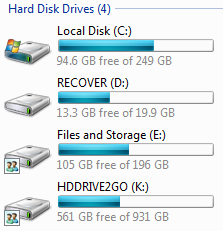 Do you have a computer which shows there is another hard drive on your computer?
The Recovery (D:) drive on your computer is a partitioned hard drive done by your computer manufacturer to allow you to simple restore your computer to its factory settings as it came when your first received your computer.
You should not touch, or alter any files or folders in this partition as it may corrupt the files making it impossible to factory reset your computer. If you do corrupt the files, you may also void your warranty.
I need more space, can I delete the files?
No! You may burn the files to a disk for backup just in case, but you should never delete or rename any of these files. If you do, and you want to restore your computer to the factory default settings, you may get an error, and would have to re-install your Operating System manually.
My computer doesn’t work. Now what?
It’s time for a factory reset. A factory reset is much easier and quicker than re-installing windows because you do not have to install the additional drivers a Windows Installer won’t do.
If you call your computer’s manufacturer’s customer support line for help on why your computer is not working, they will probably tell you to do a factory reset. If that does not fix the problem, you may want to consult a computer expert or send your computer repair shop to get repaired.
I don’t know how to do a factory reset? I Need Help!
Your computer manufacture will have details on how to do this. For a basic guideline, insert the recovery CD supplied by your computer manufacturer and follow the prompts. Alternatively, you might have to press F8 (or another F Key) to enter the recovery process.
You then have to follow the prompts. Some options may let you keep your files and folders, or you might have to completely wipe all your data and programs. But make sure you make a backup of your files first.
In summery, the Recover D: partition on your computer is there to assist you to repairing your computer if something bad goes wrong.



My pc is telling me that the recovery drive is almost full that I have to clean or delete unwanted files..what should I do. will someone let me know what to do..thank you.
Hi Wilson,
What you can do is do a disk cleanup. It is located in All Programs –> Accessories –> System Tools –> Disk Cleanup.
Run that on the D:/ drive and see if that cleans up some space.
The other thing you might want to check is to see if System Restore is enabled. If it is, you might want to disable it on the D: Drive only.
To do this, Right Click on My Computer, Click on System Restore or Advance System Settings and you will see something like System Restore.
Alternatively, follow these instructions:
XP – http://support.microsoft.com/kb/310405
Vista, 7 – http://www.howtogeek.com/howto/windows-vista/disable-system-restore-in-windows-vista/
i have locked my d drive with folder locker 5.36 which hid my all data now i am trying to gite my data even i now the password but it still not working if there is any way to recover my data a gene pleas till me
think you.
Hi Rahim,
Sorry, but I don’t know a fix for that program.
I suggest you take your computer to an computer support technician who will be able to take a physical look.
Regards,
Jack
hey dude jss simply ..format the windows or c: drive…its automaticaly open unlock the drive 🙂 dun worry…
don’t do that… you morron! Files are encrypted dude. If you delete the program, you delete the posibillity to lose the data on the D: partition
the files are encrypted with the program, so unlocking this will need help of a hacker.
You shouldn’t touch the D:/ Recovery Drive at all. Even using an encryption program can corrupt the files and make a factory reset useless.
Yes I agree with you that a factory reset is much easier and quicker than re-installing windows because you do not have to install the additional drivers a Windows Installer wonƒ??t do.
My recovery drive is almost full. It says I have 1.6 GB left. Is there a way to empty it? What happens when there is no room left?
It should be getting full. But I suggest running “Disk Cleanup” and seeing if you can remove some temporary files from it.
oh what a load of bs. if you dont mind the fact that you cant recover to the default install (which is the same as doing a clean install anyway) then delete the thing.
Of course if you delete the files on the recovery partition, the only option is to do a clean install. However, this is much harder than going through the manufacturers recovery processes.
I’m not sure if I need to do something, My HP Recovery (D) has 3/4 of the bar is blue
It says below 1.45 GB free of 11.9GB. Do I have to do something? It used to be about 1/4 blue?
Hi Beth,
There isn’t anything for you to worry about here. Those sizes are normal for a recovery drive.
Hello, thank you for the information, but i have yet another question (or should i say… problem). I factory resetted my Medion computer thnking that i had saved my files on my external harddrive, which didn’t happen for some reason. Since there were some files that were very important to me on my C: (before the reset), that I have lost now, made me wonder if there would be any way to retrieve them. I saw a folder in the D: drive named ‘Backup’ but I don’t think it would contain my lost files, or help me get them back… Would you know if it would and if not, maybe another way to retrieve them? Any help would be really appreciated. Thanks in advance!
Hi,
First of all, check the backup folder you have in D: drive – it may have the files you want. Make sure you also check the external hard drives that you have to see if the files are there as well.
Else, you will need to find a Data Recovery Expert in your area. Bare in mind, these services are costly.
Sono recentemente passato da windows vista a windows 8
nel mio p.c c’Çù sempre stata una partizione FACTORY_IMAGE (D:) 1.71GB disponibile su 12.6GB
se apro D non c’Çù nulla, forse perchǸ su proprietÇÿ di sistema, FACTORY_IMAGE (D:) Çù disattivata ?
vorrei sapere se Çù ancora utile…..grazie
Is this on a new computer or your existing computer? If on an existing computer, depending how the upgrade of Windows 8 took place, they may have removed the D drive partition.
Hi I am trying to repair my daughters computer for he I cannot access the d drive to repair windows and the computer did not come with a repair disk, What do I do?
Hello Jason,
During the boot processes, you might see a button that says “boot options”, “advance boot”, “boot settings” etc, and a keyboard shortcut like F2, F8, F12. Press this, and it should launch the recovery process. If not, contact your computer’s manufacturer for recovery support, or take it to your local PC repair shop if it is out of warranty.